A small non-profit climbing club doesn’t need a complicated content management system. It needs to change the price of a membership, add a climbing day, update an instructor’s profile, publish a new FAQ, or announce that a session is canceled. Those are data-management problems, not necessarily content-management-system problems.
For a club website I look after, I built a WordPress-style administration interface that does exactly that. It looks familiar to anyone who has used WordPress, but underneath it there’s no WordPress installation, no database, no plugin ecosystem, and no headless CMS either. The public site is Astro. Its content lives in Markdown, MDX, and YAML files in a GitHub repository. The admin interface is a small set of API routes that read and write that repository through the GitHub API, Vercel builds and deploys whatever comes out of it, and for one specific feature (generating event posters) the admin API calls out to a small poster-rendering service the club already runs. That’s basically the whole architecture. The interesting part is what isn’t there.
What actually needs managing
A conventional CMS makes everything editable, which sounds useful until you notice that most of a website’s content barely changes. The homepage’s introductory text might survive unchanged for a year; a page about the club’s history or its approach to climbing doesn’t need an administration form at all. Prices, events, instructor profiles, FAQs, contact details, membership records, and social links are a different story: those change often enough that an admin interface earns its keep.
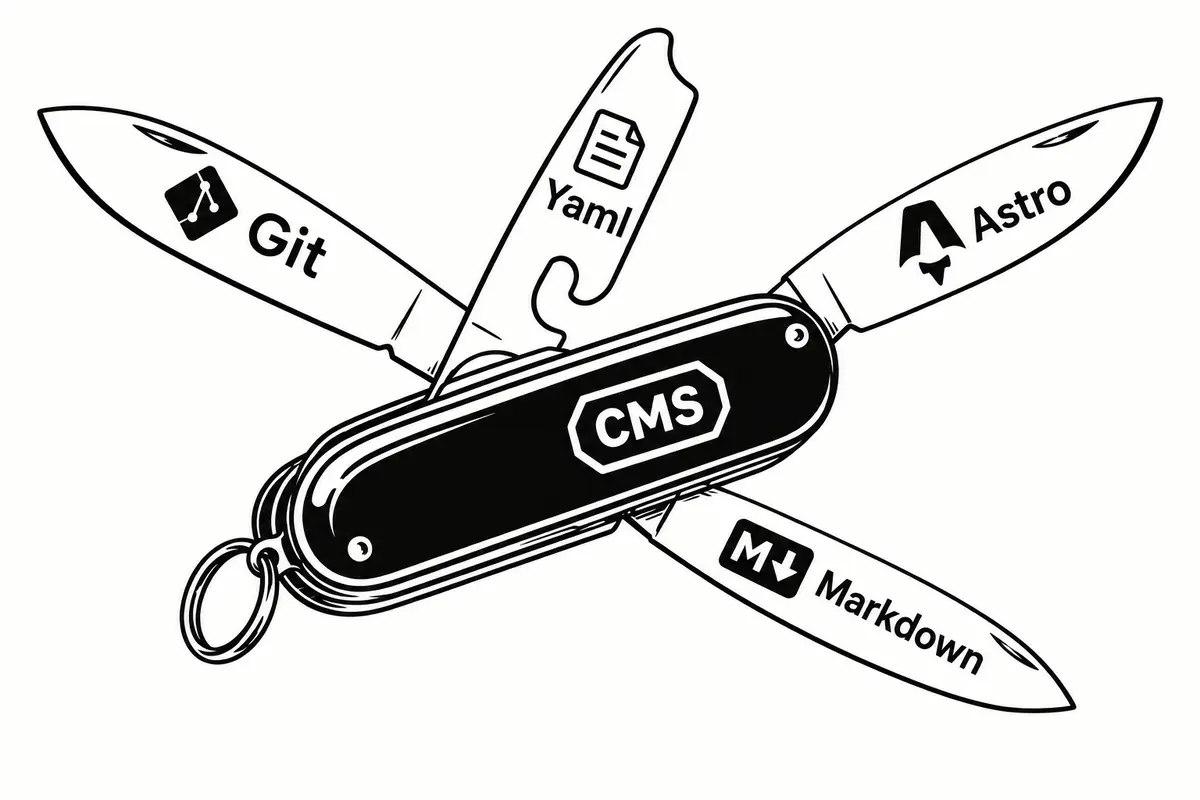
So the system draws a line between the two. Stable editorial writing stays in Markdown and MDX, and the structured data that actually changes week to week is the only thing exposed through the admin panel. The goal was never to reproduce every feature WordPress has. It was to give non-technical people control over the handful of things they’re actually likely to touch, which for a small organization is a much smaller problem than “manage the whole website.”
Not WordPress
WordPress solved a genuinely important problem: publishing a website without knowing HTML. It still does that well. But a modern WordPress install also drags in a considerable amount of infrastructure to do it: PHP, a database, an admin application, user accounts, updates, backups, themes, and a plugin ecosystem, along with every security question that comes with running an application whose entire job is to modify a live database.
Then there are the plugins. Need analytics, GDPR consent management, a particular form type, a calendar, a better image library? Install one for each. Sometimes that’s exactly the right answer. But when the website is, underneath it all, a few dozen pages plus events, prices, FAQs, and instructor bios, the system built to run it can end up considerably larger than the problem it’s solving. The alternative here is intentionally smaller.
Not a headless CMS either
The more obvious modern alternative to WordPress is a headless CMS: a good fit when several applications share one content platform, many editors need workflows and permissions, or the content model is genuinely large and structured. It’s also another system: accounts, permissions, an API, a hosted database, a content-editing interface, and another bill, sitting between the editor and the site that Astro already knows how to build.
For this club, none of that is needed, because most of the pieces already exist. The repository is already there, and Git already knows how to store structured text and keep its history. GitHub already provides authentication and an API for changing what’s in that repository. Astro already turns Markdown and MDX into pages, and Vercel already builds and deploys the result. So rather than introducing a whole CMS to solve a problem the stack doesn’t actually have, the admin interface fills the one piece that was missing: a friendly way for non-technical people to change the content that needs changing.
Lighter, faster, cheaper
There’s a useful distinction between how many features a system has and how complex it is to run. A headless CMS can offer hundreds of features without being the right answer for a small site, because every added service is another thing to configure, another authentication mechanism to understand, another dependency to maintain, and often another bill. Here the public website stays almost entirely static: Astro generates the pages ahead of time, so there’s no database query, no CMS server, and no content API sitting between a visitor and the HTML they came for. The admin API only runs when someone is actually managing the site, which makes the architecture small in the sense that matters: less infrastructure between a visitor and the page they’re trying to read.
That has a speed consequence too. Most of the work happens before the visitor arrives: Astro builds the pages from the Markdown, MDX, and YAML content, and Vercel serves the result from its own deployment infrastructure, so a page load never waits on a database or a CMS application at request time. That doesn’t mean every static site beats every headless CMS; implementation still matters. But a static-first site starts from a real structural advantage, because the public-facing application has very little left to do once someone actually asks for a page.
The cost argument is the simplest of the three. The site already runs on GitHub and Vercel, which already provide version control, build, and deployment at this scale for free. The admin API is just more of the same Vercel application, so there’s no separate CMS subscription and no server to rent purely so the CMS has somewhere to live. The system isn’t inexpensive because software is magically free. It’s inexpensive because it reuses infrastructure the website needed anyway, right down to Git’s own history standing in for a backup strategy.
The GitHub API becomes the backend
Astro’s content collections already read Markdown and MDX files and validate them against a schema. What’s missing is a safe way to edit them, and that’s the one job the admin interface actually does: when an editor opens a page, the app fetches the current file through the GitHub Contents API; when they save, an API route writes the file back, GitHub creates a commit, and that commit triggers the site’s normal Vercel deployment. There’s no second content store to keep in sync, and no copy of the content that can quietly drift from what’s on the site. The repository is the source of truth, and Git’s history comes with it for free: if a price, an event date, or a paragraph gets changed by mistake, the previous version is still sitting in the log, which is a very different recovery story than restoring a CMS database from last night’s export.
Getting there cleanly took one deliberate technical choice. The save routine doesn’t take a JavaScript object and re-serialize the whole YAML file from scratch every time one field changes: it parses the existing document and touches only the nodes that actually changed. That matters because naive YAML serialization is noisy. Quoting shifts, formatting moves around, and a bare-looking date can silently turn into a different type than the schema expects: a publish date like "2026-09-08 10:00" has to stay a string, not become whatever a YAML parser’s default date handling decides it should be. Preserve the document’s structure and touch only what changed, and a one-field edit produces a one-line diff. An editor changes a title, and the commit looks like a title changed, not like the whole file got regenerated.
The architecture
There isn’t a CMS hiding in the middle of that diagram. There are just a few API routes connecting systems that already had a reason to exist.
Familiar on purpose
None of this matters if the people who have to use it every week won’t. The volunteers running this club aren’t developers, and most of them have spent years inside an actual WordPress dashboard somewhere, so the admin interface borrows wp-admin’s visual language on purpose: compact list tables, familiar navigation, breadcrumbs, restrained panels, straightforward forms. The mental model (dashboard, then pages, then events, then prices, then FAQs, then settings) is one most of them already have, and there’s no reason to make them learn a new one just because the underlying architecture changed. The goal was never to look modern. It was to look familiar enough that someone who only wants to change the price of a climbing session can do it without a manual.
What the club can actually manage
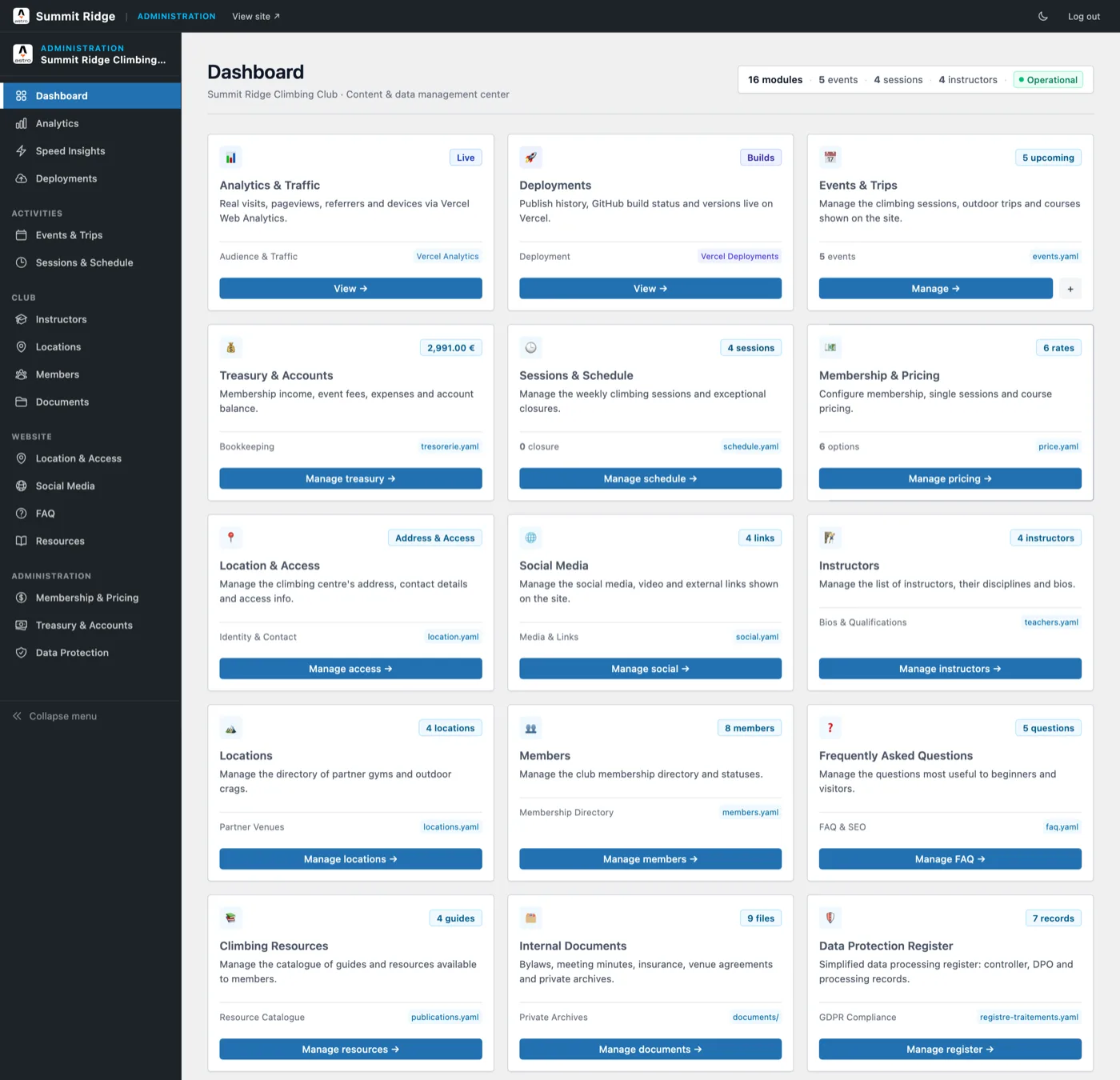
The dashboard’s own header keeps count: sixteen modules. In the order they actually appear on screen:
- Analytics & Traffic: real visits, pageviews, referrers, and devices, read live from Vercel Web Analytics rather than any file in the repository.
- Deployments: publish history and GitHub build status, read live from the Vercel API.
- Events & Trips: climbing sessions, outdoor trips, and courses, backed by
events.yaml. - Treasury & Accounts: membership income, event fees, expenses, and the account balance, backed by
tresorerie.yaml. - Sessions & Schedule: the weekly climbing sessions and exceptional closures, backed by
schedule.yaml. - Membership & Pricing: membership, single-session, and course rates, backed by
price.yaml. - Location & Access: the climbing center’s address, contact details, and access information, backed by
location.yaml. - Social Media: the social, video, and external links shown on the site, backed by
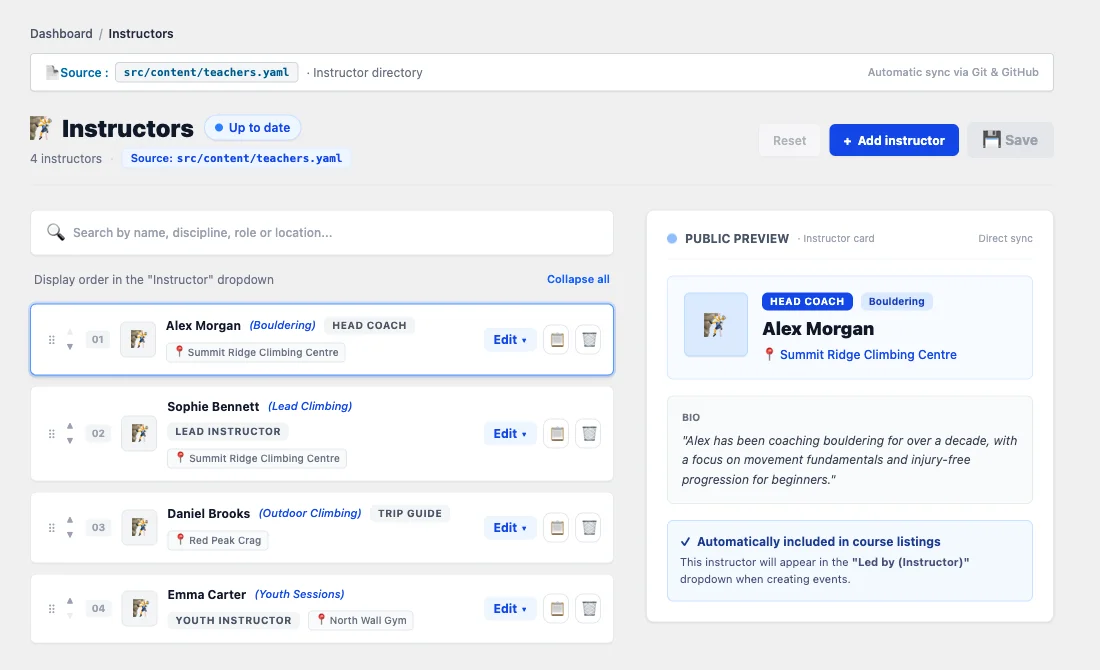
social.yaml. - Instructors: the instructor directory, disciplines, and bios, backed by
teachers.yaml. - Locations: the directory of partner gyms and outdoor crags, backed by
locations.yaml. - Members: the club’s membership directory and statuses, backed by
members.yaml. - FAQ: the questions that matter most to beginners and visitors, backed by
faq.yaml. - Climbing Resources: the catalog of guides available to members, backed by
publications.yaml. - Internal Documents: bylaws, meeting minutes, insurance, and venue agreements, kept in a private
documents/folder rather than a single file. - Data Protection Register: a simplified GDPR register (controller, DPO, and processing records), backed by
registre-traitements.yaml.
Two of those, Analytics and Deployments, don’t touch the repository at all: they’re a thin read-only window onto Vercel’s own APIs, sitting on the same dashboard as everything that does write to Git. The rest follow the same shape every time: one card, one form, one YAML file (or, for the internal documents, one private folder) committed straight back through the GitHub API described above.
Posters, generated automatically
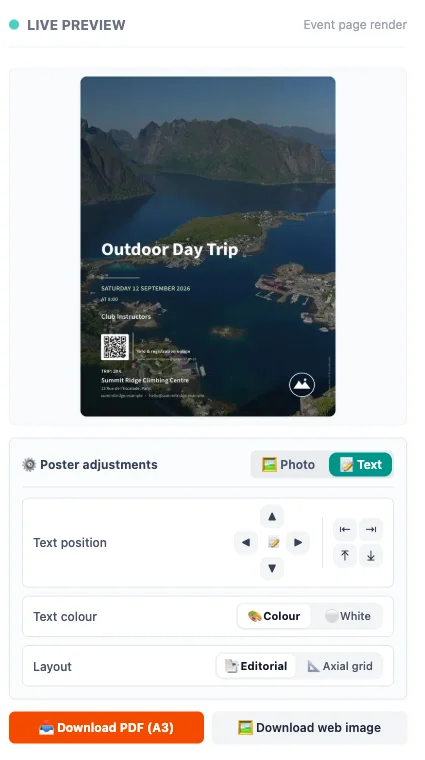
One of the more interesting parts of the system is what happens when a new event gets created. The administrator fills in the event details and picks an instructor and a photo, and the admin API sends that information to a small poster-rendering service the club runs. That service generates the poster, hands the image back, and the admin API commits it to the repository alongside the event data itself. A workflow that would normally mean creating the event in a CMS, opening a design app, finding the instructor’s photo, building the poster, exporting it, uploading it, and attaching it back to the event collapses into one form submission.
None of this makes Git a design tool. It just means that once a site’s structured data is reachable through an API, small single-purpose services can plug into it without the CMS itself turning into a platform.
Security without a database
Removing the database doesn’t remove the need for security. It just narrows what has to be secured. The admin routes check the authenticated session on every request and guard state-changing operations against forged requests, and the GitHub credential the server uses stays server-side, scoped to the one repository it needs to touch. There’s no public CMS database holding every user and every piece of content, and no plugin ecosystem’s worth of independently maintained extensions to worry about: there’s one small application whose entire job is letting an authenticated administrator change specific files in a Git repository. That’s a much smaller thing to reason about than a WordPress install’s user table and its accumulated plugin permissions.
GDPR without a plugin
A WordPress GDPR plugin usually adds a cookie banner, a data-export button, and a checkbox on the contact form. Most of what the regulation actually requires is structural, not a UI feature, so this system handles it as data instead of as a plugin.
Article 30 of the GDPR requires a register of processing activities: for every purpose an organization processes personal data for, someone has to record the legal basis, who has access, how long the data is kept, and what protects it. The Data Protection Register module is that register, one YAML record per activity, seven of them here: member management, event registrations, member and participant communications, the mailing list, payments and accounting, volunteer coordination, and the website’s own contact form. Each record carries the fields a lawyer would ask for (purpose, legal basis, recipients, retention period, security measures) filled in as structured data instead of a paragraph nobody rereads until an audit forces the question.
One field in that register can’t drift, because it isn’t typed in twice. The data controller’s own name, legal form, and address are read-only in the register, synced from the Location & Access module that already holds them. A compliance register whose own controller information has quietly gone stale since the club moved buildings is exactly the kind of small, embarrassing failure an audit catches first, and the fix here is structural: there’s only one place that address can be edited, so there’s only one place it can be wrong.
The other half of GDPR compliance is what happens to personal data after someone submits it. Every event registration collects a name, an email, sometimes a phone number, and that has to live somewhere. Here it lives in the same Git repository as everything else, but never in the clear: participant lists are encrypted with AES-256-GCM before they’re committed, with a fresh random IV generated on every write, so the file that actually reaches GitHub holds three fields (a version number, the algorithm name, and a block of ciphertext) and nothing else. The encryption key lives in an environment variable, never in the repository. A volunteer with read access to the whole commit history, which on a small team is most of them, can browse every event the club has ever run without being able to read who signed up for any of them. Only whoever holds the key, at request time through the admin UI or offline through a small decryption script, can turn that ciphertext back into names and emails.
That’s what actually lands in Git when someone registers, the whole diff:
diff --git a/people.yaml.enc b/people.yaml.enc
new file mode 100644
index 00000000..cd088b04
--- /dev/null
+++ b/people.yaml.enc
@@ -0,0 +1,4 @@
+version: 1
+algorithm: AES-256-GCM
+iv: lH4vXaZvZbqgUn9F
+ciphertext: Qc2ZMJw9ADJEaSdjnKjbKIWihYw4+8mxZxPuVVujRi+FAAhbFjtzUxChEqHp4oTlCMKmV/9DeN5ui9NPsjEb7eh3odnwruiZsO7PPj5U8pBnI7VxwDXvwMioXqHyyqM6jaTV89okeOlb8EkxXtA8qJge/GMBmuN7qB7YjBrhy5YoAlqXmjITZOfPXjvjpPhFsAlcRJEupaQYnZGBfC4/5vXQ3CnOiqVGOMbYPsAN2AZOwf4ym+hxQyR5RtSrMfK6NpTU0Tjz/rNlRAdfjItN0RNJfclaXKj6fzKDeTVya3aNjpxfs6u4
Four lines, and every one of them is either metadata or ciphertext. No reviewer, and no attacker with repo access, ever sees a name or an email in the history.
None of this required installing anything. It required treating “who can see this data, for how long, and under what justification” as a data-modeling problem, the same way the rest of the admin interface treats prices and event dates.
What stays out of the admin panel
The admin interface is deliberately incomplete, and that’s the point. The long-form editorial writing on the site (the club’s history, its approach to climbing, anything that reads like a real page rather than a data record) stays in Markdown and MDX, edited directly in the repository by whoever’s doing a substantial rewrite. The administrator doesn’t get access to every line of the website, only to the things that change often enough to be worth a form.
That inverts the usual CMS question. Instead of asking how to make every piece of the website editable, the better question is which pieces actually need to be editable. The second question produces a much smaller application.
A small CMS for a small organization
Calling this a CMS is convenient and a little misleading. It isn’t trying to compete with WordPress, and it isn’t trying to replace a proper headless CMS for an organization that actually needs one: hundreds of editors and complex workflows would make this approach the wrong call. It’s a small administration layer sitting on top of an Astro project that already had almost everything it needed. Astro handled the pages, GitHub stored the files, Vercel deployed the site, and the only piece missing was an interface a volunteer could actually use. So instead of installing a platform to get that interface, the club got a small application built specifically around what it needed: no database, no plugin marketplace, and no separate headless-CMS subscription competing for a line in a very small budget.
The part that still surprises me is what Git turned into along the way. It stopped being a developer-only tool and became the storage layer for the whole site: the history is there, the branches are there, the backups are effectively there, and the deployment history lines up with the content history because they’re the same history. None of that is visible to the person actually using the admin panel, and it shouldn’t be. They don’t need to know that clicking save creates a commit. They just know they changed a price, added a climbing day, or fixed a typo in the FAQ.
The question worth asking wasn’t how to build a better generic CMS. It was what the smallest system is that gives this particular organization the control it actually needs. For a small non-profit climbing club, the answer turned out to be smaller than expected going in: Astro for pages, Markdown and YAML for content, GitHub for storage and history, Vercel for the build and the runtime, a small admin layer for editing, and the odd single-purpose service, like the poster generator, bolted on only where there was a genuine need for one. No database, no plugin marketplace, no separate headless CMS to pay for, and nobody running the club has to become a developer to change the things that actually change.