What if a small organization didn’t need a CMS at all?
Not a lighter one, not a cheaper one. None.
A nonprofit or independent club’s website can easily run to a few hundred pages between history, policies, program pages, and years of past events. A conventional CMS treats all of that as equally editable, because that’s what a CMS is built to do. But watch how a small organization actually uses its own site and a different pattern shows up. Most of those pages are written once and barely touched again. A comparatively small slice of the content (events, prices, the weekly schedule, who’s teaching what) changes often enough that someone needs a real way to update it. That’s the part worth building an editing interface for. The rest isn’t.
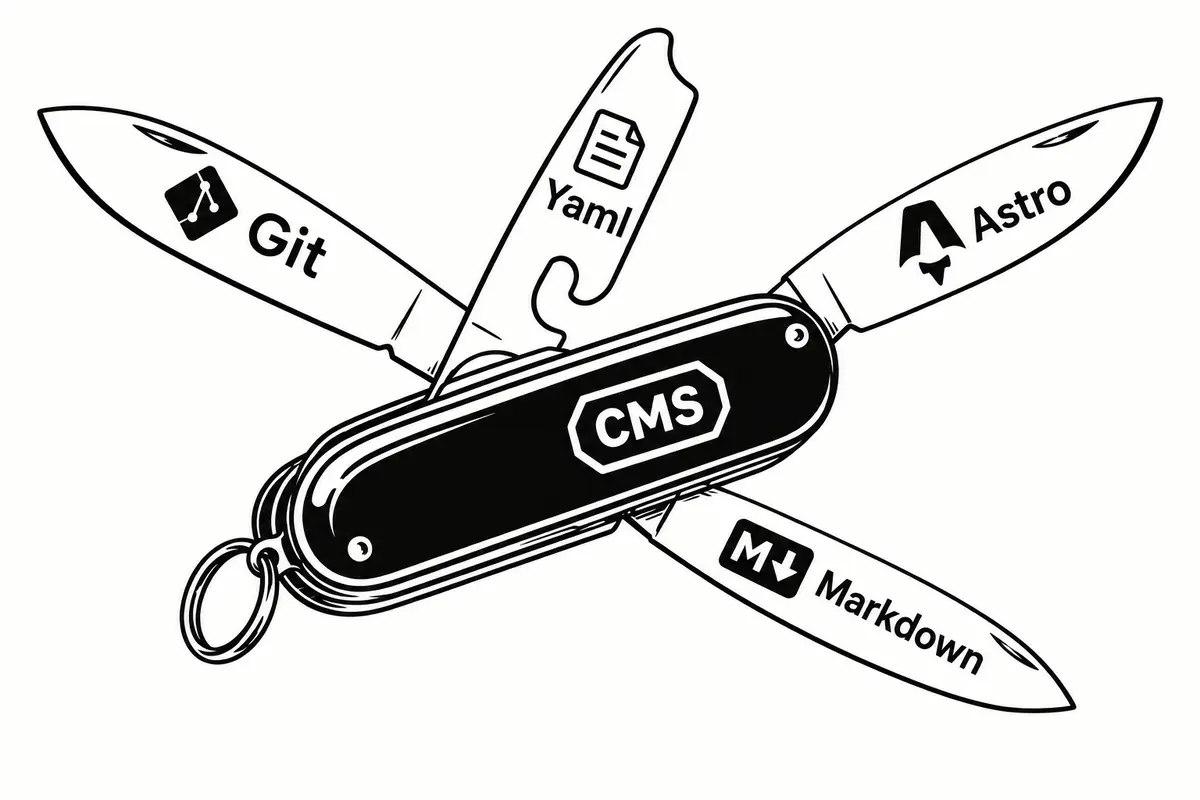
So the useful question was never “how do we build a CMS.” It’s “what is the smallest editing interface this organization actually needs.” For a small climbing club whose site I build and maintain, the answer turned out to be a WordPress-shaped admin panel with no WordPress underneath it: no database, no plugin ecosystem, nothing to patch or subscribe to. Astro publishes the site. Git and GitHub hold the content. A small admin interface exists for exactly the data that changes often enough to be worth a form.
The idea, in one diagram
The whole system is one path, short enough to draw as a straight line:
- Non-technical editor
- Small admin interface
- API / GitHub
- Markdown / YAML in Git
- Vercel build
- Astro static website
Four things are doing four different jobs, and it’s worth naming them separately instead of lumping all of it under “CMS”:
Git
Source of truthAstro
PublishingYAML & Markdown
Content formatAdmin interface
Editorial layerAn editor never sees a commit, a branch, or a diff. They see a form. Git is still doing exactly what Git does underneath, for someone else’s benefit entirely.
The content that actually changes
Not every page on a small organization’s site earns the word “content” in the CMS sense. Some of it is closer to furniture: written once, correct for years, not worth an editing form. The rest is closer to inventory: it turns over, and someone needs to update it without opening a code editor.
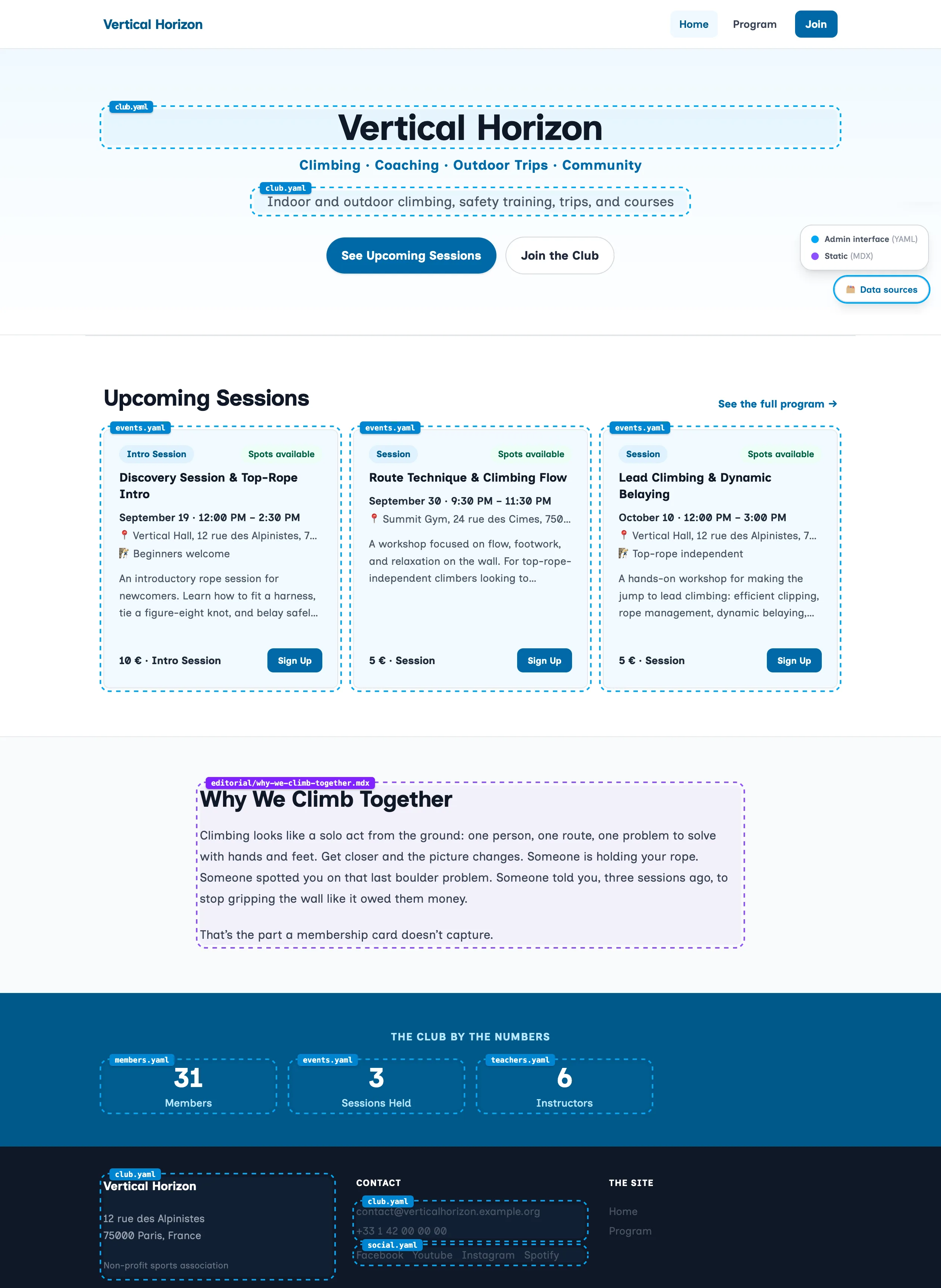
Note. The club and the screenshots below, Vertical Horizon, are fictional. They are representative of nonprofits and independent organizations whose websites I’ve built and maintain, while keeping their actual data and branding confidential.
| Content | How often it changes | Editing interface |
|---|---|---|
| Events & trips | Often | Form |
| Sessions & schedule | Often | Form |
| Membership & pricing | Occasionally | Form |
| Instructors | Occasionally | Form |
| FAQ | Occasionally | Form |
| Social media links | Occasionally | Form |
| Location & access details | Rarely | Form |
| Treasury, members, documents, GDPR register | Rarely | Form |
| Long-form pages (club history, approach to climbing) | Rarely | Markdown/MDX |
| Site design | Very rarely | Code |
The website may hold a lot of content. That doesn’t mean all of it needs an editing interface. Long-form writing, the club’s history, its approach to climbing, anything that reads like a real page rather than a data record, stays in Markdown and MDX, edited directly in the repository by whoever is doing a substantial rewrite. Everything in the top half of that table gets a form. Everything in the bottom half doesn’t, and shouldn’t.
GitHub is the backend, not the editorial interface
Git already solves the storage problem. It stores structured text, keeps every version of it, and comes with an API, GitHub’s, for reading and writing files from outside a terminal. For a developer, that’s already a perfectly good content workflow:
$ vim events.yaml
$ git diff
$ git commit -m "Add outdoor day trip"
$ git push
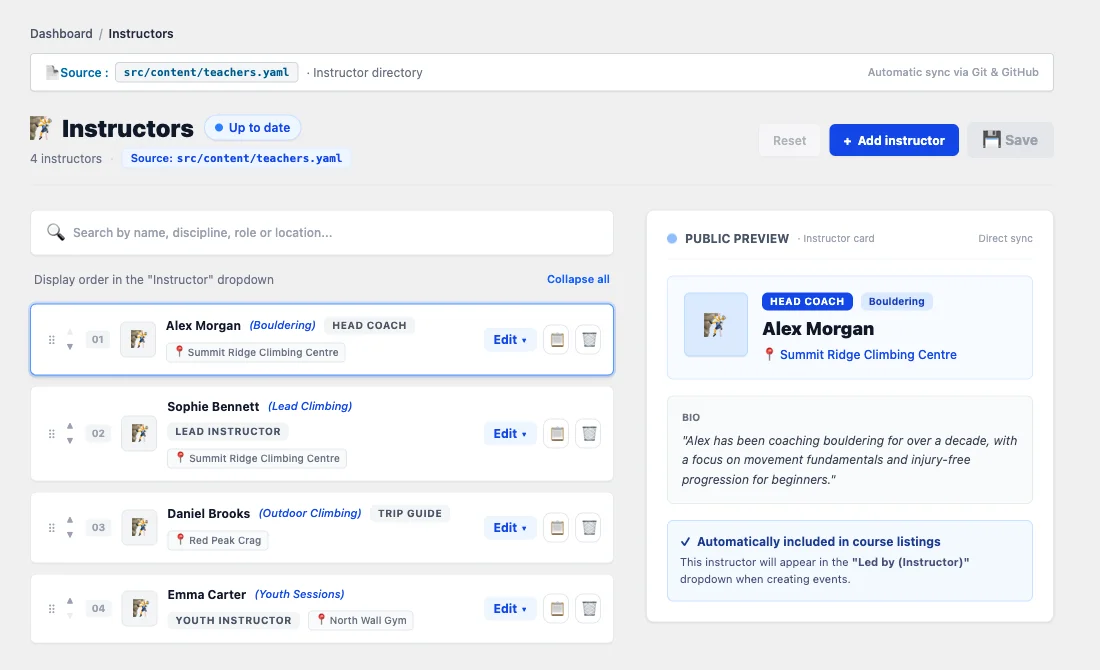
For a volunteer running a climbing club, it isn’t a workflow at all. Expecting someone to install Git, understand branches, and write a commit message to add a Tuesday session isn’t a lightweight solution. It’s homework. What that person needs instead:
GitHub is an excellent developer interface. It’s not, on its own, an appropriate editorial interface. That gap, between “Git can store this” and “a volunteer can edit this,” is exactly what the admin interface fills, and it’s the only piece of this system that had to be built from scratch.
Under that form, saving is mechanical:
- An editor opens a page; the app fetches the current file through the GitHub Contents API.
- They make their edit and save.
- An API route writes the file back, and GitHub creates a commit.
- That commit triggers the site’s normal Vercel deployment.
There’s no second content store to keep in sync, and no copy of the content that can quietly drift from what’s on the site. It’s the same argument I’ve made before for keeping content in files instead of a database. The repository is the only copy, so it can’t disagree with itself.
One deliberate technical choice makes that diff readable. The save routine doesn’t take a JavaScript object and re-serialize the whole YAML file from scratch every time one field changes: it parses the existing document and touches only the nodes that actually changed. That matters because naive YAML serialization is noisy. Quoting shifts, formatting moves around, and a bare-looking date can silently turn into a different type than the schema expects (a publish date like "2026-09-08 10:00" has to stay a string, not become whatever a YAML parser’s default date handling decides it should be). Preserve the document’s structure and touch only what changed, and a one-field edit produces a one-line diff. An editor changes a title, and the commit looks like a title changed, not like the whole file got regenerated.
The architecture
Zoom out from any one save and the shape of the whole system is this:
Five layers, five different jobs: the browser UI an editor touches, the Vercel API routes that authenticate and route the request, the YAML/MDX parsing step that applies a minimal edit, GitHub’s Contents API as the write path into the repository, and Vercel’s own build-and-deploy step that turns a new commit into a new deployment. There’s no CMS hiding in the middle of that diagram. There are a few API routes connecting systems that already had a reason to exist, plus one small poster-rendering service bolted on for a single feature, covered further down.
Git’s history is a genuine, useful side effect of this design, and it’s worth being precise about what it actually buys. Every save is a commit, so a price, an event date, or a paragraph changed by mistake is recoverable: the previous version is still sitting in the log. That’s real, and it’s a meaningfully better story than most CMS “undo” features. It isn’t, on its own, a backup strategy. Git history protects against accidental or bad edits inside the repository. It doesn’t protect against the repository itself being deleted, the hosting account being compromised, or the one place the encryption key lives (more on that in a moment) disappearing. Those still need an actual backup and access-control plan, same as with any other system. Version history and disaster recovery are related, not identical.
What editors can actually manage
None of this matters if the people who have to use it every week won’t. The volunteers running this club aren’t developers, and most of them have spent years inside an actual WordPress dashboard somewhere, so the admin interface borrows wp-admin’s visual language on purpose: compact list tables, familiar navigation, breadcrumbs, plain forms. Nobody has to learn a new mental model just because the underlying architecture changed underneath them.
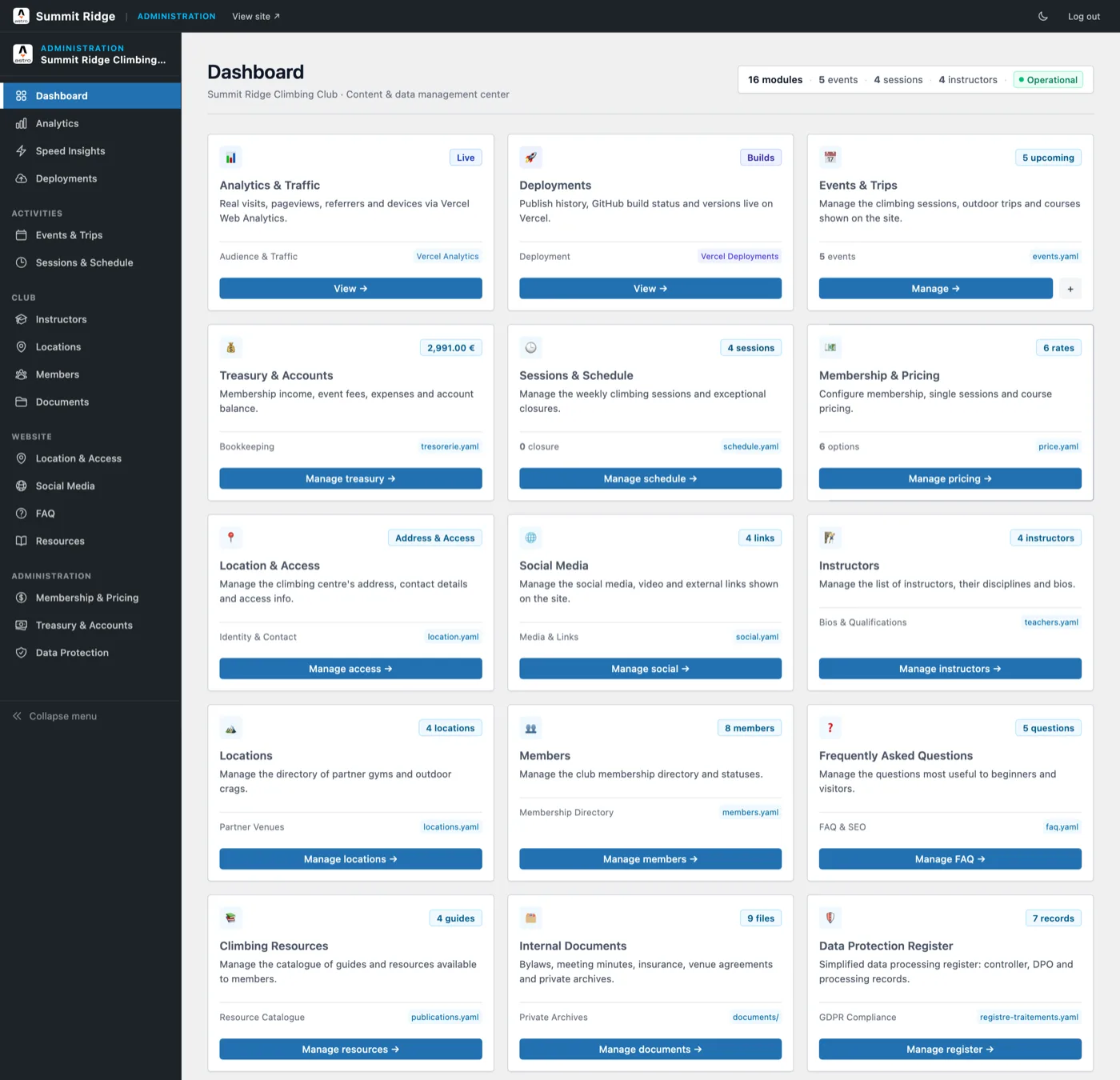
Grouped by what they actually do, rather than where they sit in the sidebar, there are three kinds of module on that dashboard.
Content editors. The public-facing structured data from the table above: Events & Trips (events.yaml), Sessions & Schedule (schedule.yaml), Membership & Pricing (price.yaml), Location & Access (location.yaml), Instructors (teachers.yaml), Locations, the directory of partner gyms and outdoor crags (locations.yaml), FAQ (faq.yaml), Climbing Resources (publications.yaml), and Social Media (social.yaml). Each one follows the same shape: one card, one form, one YAML file committed straight back through the GitHub API described above.
Administrative and organizational data. Treasury & Accounts (treasury.yaml), Members (members.yaml), Internal Documents (bylaws, meeting minutes, insurance and venue agreements, kept in a private documents/ folder rather than a single file), and the Data Protection Register (data-processing-record.yaml, covered in the security section below). Same mechanism as the content editors, different audience: this is data the organization needs to track, not content the public site renders.
Read-only operational information. Analytics & Traffic and Deployments don’t touch the repository at all. They’re a thin, read-only window onto Vercel’s own APIs (Web Analytics and the deployment log), sitting on the same dashboard as everything that does write to Git, because that’s where an administrator would look for them, not because they’re the same kind of thing.
From YAML to a live website
Everything above describes how content gets written. This is what happens on the other end.
This isn’t a mockup. The event below is being served from the same data and API pipeline this article has been describing, fetched live, at build time, on this page:
The Events & Trips module is a good one to see working end to end, because that path is public: events.yaml is read by a small companion Astro API, and the block below fetches it live from /api/events at build time, on this page, the same way any other consumer of that read-only endpoint would. The API it hits is a demo instance, set up specifically so this example has something real to fetch from, not an actual production system.
Live from the events API · fetched at build time
No upcoming events at the moment.
That’s the whole round trip: a YAML file behind an admin form, served by a stateless API route, pulled into a static page at build time, with no database in between and nothing in this block hard-coded into the site. Switch to the “Raw JSON” tab above to see exactly what /api/events returned to build this block.
The point isn’t the JSON payload. It’s that this piece of structured content can be consumed independently of the website it was written for.
Why the API matters
A YAML file sitting in a repository is only reachable by whatever reads that repository. An API changes that. Once /api/events exists, anything that can make an HTTP request can read the club’s upcoming events without touching Git, GitHub credentials, or Astro’s build process at all.
This blog is one working example of that, not a hypothetical one. It’s a separate Astro project, with no access to the club’s repository, and the live block above proves the point: it fetches over HTTP from a public endpoint at build time, exactly like any other outside consumer would.
Other consumers aren’t built yet, but the API doesn’t need that to be true to be worth having. The same endpoint could, in principle, feed a calendar app, a mobile app, an internal dashboard, or a second website entirely, without any of them needing write access to the repository or knowledge of how the admin interface works. I’ve made a version of this argument before for structured content with more than one output. Once content is genuinely structured and reachable through an API, the number of things that can consume it stops being tied to the number of things that can edit it.
Automation: one dataset, multiple outputs
Separating structured content from presentation pays off in places that have nothing to do with the website itself. When an administrator creates a new event and picks an instructor and a photo, the admin API sends that data to a small poster-rendering service the club already runs. That service generates a poster, hands the image back, and the admin API commits it to the repository alongside the event data.

A workflow that would normally mean creating the event in a CMS, opening a design app, finding the instructor’s photo, building the poster, exporting it, and attaching it back to the event collapses into one form submission. None of this makes Git a design tool. It’s the API argument from a different angle: once an event is one structured record instead of scattered across a CMS entry, a design file, and an export folder, small single-purpose services can plug into that record without the admin interface itself turning into a platform. Worth keeping that instinct in check, though. The moment automation like this starts justifying its own new CMS features, it has stopped being the smallest system that works.
Security and personal data
Three different things get called “content” on this site, and they don’t deserve the same treatment: public website content (pages, event descriptions, things any visitor already sees), structured operational content (prices, schedules, the treasury) that the organization needs but a visitor doesn’t, and personal data (names, emails, phone numbers collected on registration) that comes with actual legal obligations attached.
Removing the database doesn’t remove the need for security on the first two categories. It narrows what has to be secured. The admin routes check the authenticated session on every request and guard state-changing operations against forged requests, and the GitHub credential the server uses stays server-side, scoped to the one repository it needs to touch. There’s no public database holding every user and every piece of content, and no plugin ecosystem’s worth of independently maintained extensions to worry about: one small application, whose entire job is letting an authenticated administrator change specific files in a repository, is a considerably smaller thing to reason about than a WordPress install’s user table and its accumulated plugin permissions.
Personal data gets stricter treatment, because storing it in Git at all is a real design decision, not a default. Article 30 of the GDPR requires a register of processing activities: for every purpose an organization processes personal data for, someone has to record the legal basis, who has access, how long the data is kept, and what protects it. The Data Protection Register module is that register, one YAML record per activity, seven of them here (member management, event registrations, communications, the mailing list, payments and accounting, volunteer coordination, and the website’s own contact form), each carrying the fields a lawyer would ask for, as structured data instead of a paragraph nobody rereads until an audit forces the question. The controller’s own name, legal form, and address are read-only in that register, synced from the Location & Access module that already holds them, so there’s only one place that address can be wrong instead of two.
Actual registration data gets the strongest treatment. An event registration collects a name, an email, sometimes a phone number, and it lives in the same Git repository as everything else, but never in the clear: participant lists are encrypted with AES-256-GCM before they’re committed, with a fresh random IV on every write, so the file that reaches GitHub holds a version number, an algorithm name, and a block of ciphertext, nothing else. The encryption key lives in an environment variable, never in the repository. A volunteer with read access to the whole commit history, which on a small team is most of them, can browse every event the club has ever run without being able to read who signed up for any of them. This is what actually lands in Git when someone registers, the whole diff:
diff --git a/people.yaml.enc b/people.yaml.enc
new file mode 100644
index 00000000..cd088b04
--- /dev/null
+++ b/people.yaml.enc
@@ -0,0 +1,4 @@
+version: 1
+algorithm: AES-256-GCM
+iv: lH4vXaZvZbqgUn9F
+ciphertext: Qc2ZMJw9ADJEaSdjnKjbKIWihYw4+8mxZxPuVVujRi+FAAhbFjtzUxChEqHp4oTlCMKmV/9DeN5ui9NPsjEb7eh3odnwruiZsO7PPj5U8pBnI7VxwDXvwMioXqHyyqM6jaTV89okeOlb8EkxXtA8qJge/GMBmuN7qB7YjBrhy5YoAlqXmjITZOfPXjvjpPhFsAlcRJEupaQYnZGBfC4/5vXQ3CnOiqVGOMbYPsAN2AZOwf4ym+hxQyR5RtSrMfK6NpTU0Tjz/rNlRAdfjItN0RNJfclaXKj6fzKDeTVya3aNjpxfs6u4
Four lines, and every one of them is either metadata or ciphertext. No reviewer, and no attacker with repository access, ever sees a name or an email in the history.
These measures address real GDPR concerns: a documented legal basis, minimized and time-bound retention, encryption of the personal data that’s actually sensitive. They don’t, by themselves, establish that the whole system is GDPR compliant. Compliance also depends on things this article can’t verify from the outside, like the organization’s actual retention practice, its data-processing agreements, and how the encryption key itself is stored and rotated. Treat this as a reasonably well-designed technical foundation, not a compliance certificate.
Where this approach stops working
This isn’t a CMS for every organization, and it would be a mistake to read it that way. The Git-plus-Astro approach starts making less sense as soon as an organization needs things this design was never trying to provide:
- many editors working at once, with real permission tiers between them
- formal editorial workflows: drafts, review, scheduled publishing, sign-off
- real-time collaboration on the same document
- a large media library with proper asset management
- extensive localization workflows across many languages
- large-scale relational content, where records reference and depend on each other in complex ways
- several applications sharing one content platform, each with different needs
- sophisticated publishing workflows generally
- editors who need to manage content, including the schema itself, completely independently of a developer
None of that makes WordPress or a headless CMS the wrong choice for those organizations. It makes them the right tool for a different, larger problem than the one this article is solving.
When to choose WordPress or a headless CMS
Put next to the two obvious alternatives, the trade-offs are less about which system is “better” and more about which problem each one is actually built for. This is a qualitative comparison, not a benchmark: your mileage depends heavily on implementation, team, and scale.
| Requirement | Git + Astro admin | WordPress | Headless CMS |
|---|---|---|---|
| Small organization | Excellent | Good | Often excessive |
| Structured content | Excellent | Good | Excellent |
| Long-form content | Excellent | Excellent | Excellent |
| Simple editorial UI | Good | Excellent | Excellent |
| Many editors | Limited | Excellent | Excellent |
| Editorial workflows | Limited | Good to excellent | Excellent |
| Multiple frontends | Limited | Limited to good | Excellent |
| Complex relationships | Limited | Good | Excellent |
| Git-based history | Excellent | Limited | Depends |
| Minimal infrastructure | Excellent | Moderate | Moderate to high |
| No CMS subscription | Excellent | Excellent | Often low-cost or free tiers available |
WordPress earns its “Excellent” marks for a real reason: it solved editorial UI and multi-editor workflows a long time ago, and it still does that well. What it drags in to do it, PHP, a database, an admin application, user accounts, updates, and a plugin ecosystem, is a reasonable trade for an organization that actually uses that surface area. For one that mostly needs to change a handful of prices and add a Tuesday session, that surface area is mostly unused weight. A headless CMS makes a similar trade at a different scale: real value once several applications share one content platform or many editors need real workflows and permissions, and otherwise another system sitting between the editor and the site Astro already knows how to build.
The smallest system that works
The lesson here isn’t that every website should use Git as its CMS. Most shouldn’t, and the comparison table above says exactly where that line sits.
It’s that content architecture and editing interfaces don’t have to be the same thing. Git can be an excellent content store without being the interface anyone actually edits through. Astro can be an excellent publishing system without being a CMS. And a small organization can get a CMS-like editing experience (forms, familiar navigation, a save button) without installing a conventional CMS to get there.
What surprised me, building this, wasn’t the architecture. It was how much of it was already sitting there unused. The repository was already the source of truth. GitHub already had an API. Astro already turned files into pages, and Vercel already deployed the result. The only piece actually missing was a form a volunteer could use without knowing what a commit is. Once that piece existed, everything else the club needed was already true. They just didn’t know it yet, because nobody had asked the smaller question first.