Core thesis: For small-to-medium structured reference data that needs to live in Git and render across multiple formats, YAML functions as an ideal single source of truth—decoupling pure data from presentation without the runtime overhead of a database or the verbosity of XML.
- 1. Structured YAML source
- 2. Static site / build generator
- 3. Multiple derived outputs (tables, lists, APIs)
- 4. Clean, reviewable Git diffs
- 5. Schema validation & consistency
YAML is a lightweight, human-readable data format that simplifies configuration files and data exchange. Its clarity, flexibility, and efficiency make it increasingly popular among developers, often outperforming XML, Markdown, and some database solutions in modern documentation pipelines.
The core architectural argument rests on three points:
- The problem: When structured reference data is mixed with presentation markup, keeping catalogs, tables, and specifications updated becomes an error-prone maintenance bottleneck.
- The proposal: Store reference facts in plain YAML files under full Git version control, completely decoupled from layout.
- The payoff: Render that single source into tables, lists, headless APIs, and UI widgets while preserving atomic Git diffs and branch-based reviews.
Storing content in plain files rather than a database keeps your source code accessible to standard text-processing tools, makes peer reviews transparent, and fits directly into CI/CD build steps.
Imaginary scenario: choosing the right engine oil
Imagine you’re an engine oil manufacturer. Every day, customers ask you which oil is best for their engines. Some have one-cylinder engines, others have multi-cylinder setups. Price, viscosity, and compatibility all matter, but helping them make the right choice isn’t just about knowing your products. It’s about how you store and present that information.
To anchor this architectural choice, we will follow a single continuous dataset throughout this article: an engine-oil catalog tracking six core attributes:
Oil Data Model
├── type            # Category / designation: Primary oil, Secondary oil
├── brand (name)    # Product brand identifier: A1X, B2Z
├── usage           # Target engine: One-cylinder engines, Two-cylinder engines
├── price           # Unit price (numeric float): 15.00, 17.00
├── cylinders       # Engine cylinders (integer): 1, 2
└── viscosity_grade # SAE rating: 0W-20, 5W-30
At first, managing this catalog looks simple enough. You create a quick reference table:
| Oil Type | Brand | Use | Price | Viscosity Grade |
|---|---|---|---|---|
| Primary oil | A1X | One-cylinder engines | 15 | 0W-20 |
| Secondary oil | B2Z | Two-cylinder engines | 17 | 5W-30 |
Looks neat, right? But as your product line grows, so does the complexity. Adding new oils, updating prices, or including extra metadata like cylinder count or warranty quickly turns into a maintenance problem.
- 1. Small dataset (looks easy)
- 2. Product catalog expands
- 3. Extra metadata fields added
- 4. Multi-format requirements emerge
- 5. Exponential maintenance cost
The XML temptation
Some teams turn to DITA reference XML, thinking formal structure will solve the problem:
DITA-style reference XML XML
<reference id="oil-types">
  <title>Oil types</title>
  <shortdesc>You will find below the recommended oil types.</shortdesc>
  <refbody>
    <section>
      <title>Primary oil</title>
      <ul>
        <li>Brand: A1X</li>
        <li>Use: One-cylinder engines</li>
        <li>Price: 15</li>
        <li>Viscosity grade: 0W-20</li>
      </ul>
    </section>
    <section>
      <title>Secondary oil</title>
      <ul>
        <li>Brand: B2Z</li>
        <li>Use: Two-cylinder engines</li>
        <li>Price: 17</li>
        <li>Viscosity grade: 5W-30</li>
      </ul>
    </section>
  </refbody>
</reference>
What XML provides: Explicit document structure, semantic tagging, and formal DTD/XSD validation.
What becomes painful in this specific use case: The moment prices change, new products are added, or you want to track extra attributes, the XML becomes cumbersome:
| Issue | Description |
|---|---|
| Hardcoded Values | Every data point is embedded in XML. Updates require manual changes across every topic, which is error-prone. |
| Mixing Data and Presentation | <ul> and <li> combine field names and values, making automated sorting or aggregation difficult. |
| Poor Scalability | Adding oils or metadata requires repeating verbose boilerplate XML structures. |
| Lack of Unique Identifiers | Sections are distinguished by titles only, risking breakage in workflows if names change. |
| Limited Reusability | Copying sections across documents increases the risk of drift and inconsistencies. |
| Ambiguous Values | <li>Price: 15</li> lacks units or currency formatting. |
| No Validation for Consistent Structure | Missing fields reduce data quality over time without custom Schematron rules. |
Hardcoded XML works for tiny static lists, but it quickly becomes brittle as catalog content grows.
Markdown tables: simple but limiting
Markdown tables are immediately readable in raw text:
| Oil Type      | Brand | Use                  | Price | Viscosity Grade |
| ------------- | ----- | -------------------- | ----- | --------------- |
| Primary oil   | A1X   | One-cylinder engines | 15    | 0W-20           |
| Secondary oil | B2Z   | Two-cylinder engines | 17    | 5W-30           |
What Markdown provides: Fast authoring, high human readability in raw text, and universal static-site generator support.
What breaks down when data scales: Behind the tidy appearance, embedded tables carry hidden maintainability problems:
| Issue | Description |
|---|---|
| Hardcoded Data | Manual updates are required for every price or product change. |
| Lack of Semantic Structure | Field names and values are visual table cells, not machine-readable key-value pairs. |
| Poor Scalability | Adding new oils or metadata requires manually refactoring every pipe and separator. |
| No Unique Identifiers | Rows are identified only by “Oil Type,” making programmatic referencing unreliable. |
| Ambiguities | Values like Price: 15 lack units or types, causing downstream ambiguity. |
| Limited Reusability | Tables cannot be reused across multiple documents without manual copy-pasting. |
The limits of Markdown tables
Markdown was designed so that the source should be almost as human-readable as the output, whether rendered as HTML, PDF, or another format. But tables are an exception: they introduce several authoring challenges.
Long lines quickly become difficult to read and edit as text editors wrap them, making it hard to distinguish one row from another. The visual benefit of tables for readers (having columns neatly aligned on vertical pipes) turns into an authoring liability:
| Oil Type | Brand | Use  | Price | Viscosity Grade |
| - | - | - | - | - |
| Primary oil | A1X | One-cylinder engines | 15 | 0W-20 |
| Secondary oil | B2Z | Two-cylinder engines | 17 | 5W-30 |
Markdown source table
Some text editors automatically realign table columns when you edit a cell, but this triggers a full table refactor. The result is a noisy Git diff where Git flags entire lines as changed even though only a few whitespace characters moved. Conversely, if you avoid reformatting and keep column widths ragged, the raw table becomes frustrating for humans to parse.
Markdown is excellent for prose, but as your structured reference data grows, you need an architecture that decouples content from layout.
Databases: powerful, but a poor fit for source content
Databases are excellent at what they’re built for: structured storage, rich queries, integrity constraints, and concurrent access at scale. The question isn’t whether they’re capable: it’s whether they fit documentation source code.
Where Databases Excel
Query engine & live transactions
Arbitrary SQL queries, relational joins, ACID transactions, concurrent multi-user writes, and scaling to millions of dynamic records that update independently of site builds.
Where Docs-as-Code Diverges
Source-content workflow & Git review
Branching, peer review in pull requests, offline text editing, commit history, zero runtime infrastructure dependencies, and static deployment alongside application code.
For content you want to version, review, and build into a static site, a database pulls in the opposite direction. It introduces a live service to run, migrate, back up, and secure. Most importantly, the content lives outside Git: you lose readable diffs, branch-and-PR review, and editing offline in your text editor. The data is no longer plain text you can grep, refactor with sed, or roll back with a commit.
That is the real trade-off: not query performance, but where your content lives and how you change it.
YAML: readable, structured, and scalable
This is where YAML shines. It is human-readable, hierarchical, and structured, making it ideal for reference documentation that needs to scale under version control.
- 1. Structured YAML source (facts only)
- 2. Typed component layer (Astro / script)
- 3. Multi-format outputs (tables, lists, APIs)
Here is the canonical data source (oil-types.yaml):
id: oil-types
title: Oil types
shortdesc: Recommended oil types
properties:
  headers:
    type: Type
    value: Brand
    usage: Use
  rows:
    - type: Primary oil
      value: A1X
      usage: One-cylinder engines
    - type: Secondary oil
      value: B2Z
      usage: Two-cylinder engines
Rendered in Markdown or HTML via a simple build script, it produces a clean presentation table:
| Oil type | Oil brand | Use |
|---|---|---|
| Primary oil | A1X | One-cylinder engines |
| Secondary oil | B2Z | Two-cylinder engines |
Benefits of YAML as a source of truth
| Feature | Details |
|---|---|
| Separation of Data and Presentation | Pure data lives in YAML; styling and markup live in reusable templates or components. |
| Structured and Predictable | Consistent schemas reduce human error and simplify automated processing. |
| Easy to Extend | Add new oil records or metadata attributes without altering existing layouts. |
| Supports Automation | Static site generators, build scripts, and CI runners consume YAML natively. |
| Unique Identifiers | Top-level id keys enable unambiguous cross-referencing across topics and datasets. |
| Readable and Maintainable | Self-documenting key-value pairs are easier to inspect than embedded XML tags or pipe tables. |
| Scalable for Datasets | Works cleanly for 5 or 500 rows while keeping diffs concise and validation automated. |
YAML versatility: one source, multiple output formats
The central payoff of structured data is versatility. The same dataset can be rendered in multiple representations—lists, summary cards, data tables, or headless APIs—without changing a single character in the source file.
Below are three live representations generated from the exact same oil-types.yaml dataset:
Output 1: Compact list for quick scanning
For user guides or mobile-friendly overviews where a wide table is unnecessary, the data renders as a clean bulleted hierarchy:
Example: Display your data as a simple list
Oil types
You will find below the recommended oil types.
- Primary oil
- Brand: A1X
- Usage: One-cylinder engines
- Viscosity grade: 0W-20
- Price: $15.00
- Secondary oil
- Brand: B2Z
- Usage: Two-cylinder engines
- Viscosity grade: 5W-30
- Price: $17.00
Output 2: Responsive two-column summary
For summary reference pages, a two-column layout pairs each brand with its technical properties. On desktop, this renders as a table; on mobile viewports, it collapses into individual labeled rows inside cards:
Example: Display your data as a styled two-column table
Oil types
You will find below the recommended oil types.
| Brand | Details |
|---|---|
| A1X | Type: Primary oil Price: $15.00 Cylinders: 1 Viscosity Grade: 0W-20 |
| B2Z | Type: Secondary oil Price: $17.00 Cylinders: 2 Viscosity Grade: 5W-30 |
Output 3: Dynamic, sortable four-column table
For comprehensive engineering specifications, the same YAML file feeds an interactive table featuring typed sorting (numeric pricing, integer cylinder counts, alphabetical text) and formatted currency labels:
Example: Display your data as a dynamic HTML table
| Primary oil | A1X | One-cylinder engines | 0W-20 | $15.00 |
| Secondary oil | B2Z | Two-cylinder engines | 5W-30 | $17.00 |
Notice the key architectural takeaway: all three outputs derive from a single file. If the price of Primary oil changes to $16.50, you update that single value in oil-types.yaml. The list, the two-column summary, the four-column table, and the API payload all update in lockstep during the next build.
Easier diffs and cleaner version control
One of the most practical benefits of this architecture is version control hygiene. When data and presentation are mixed, even trivial changes produce noisy Git diffs that make code reviews slow and error-prone.
- 1. Clean rendered table
- 2. Edit single column in source
- 3. Editor realigns column whitespace
- 4. Git flags every row as modified
- 5. Code review noise obscures real diff
Evidence 1: Reordering columns in an embedded Markdown table
When you remove or reorder a column in a Markdown table, Git compares the file line by line. Every single row appears modified because the column delimiters moved:
Git diff: reordering columns in a Markdown table Diff
diff --git a/src/content/blog/scalable-maintainable-technical-docs-with-yaml.mdx b/src/content/blog/scalable-maintainable-technical-docs-with-yaml.mdx
index 61dadd8..0f70057 100644
--- a/src/content/blog/scalable-maintainable-technical-docs-with-yaml.mdx
+++ b/src/content/blog/scalable-maintainable-technical-docs-with-yaml.mdx
@@ -26,10 +26,10 @@ Imagine you’re an engine oil manufacturer. Every day, customers ask you which

   At first, it might seem simple. You could create a quick reference table:

-| Oil Type      | Brand | Use                  | Price | Viscosity Grade |
-| ------------- | ----- | -------------------- | ----- | --------------- |
-| Primary oil   | A1X   | One-cylinder engines | 15    | 0W-20           |
-| Secondary oil | B2Z   | Two-cylinder engines | 17    | 5W-30           |
+| Oil Type      | Use                  | Price | Viscosity Grade |
+|---------------|----------------------|-------|-----------------|
+| Primary oil   | One-cylinder engines | 15    | 0W-20           |
+| Secondary oil | Two-cylinder engines | 17    | 5W-30           |
Notice: Even though the actual product data was untouched, four lines were flagged as deleted and replaced. Reviewers cannot quickly tell if a price or viscosity was altered.
Tip: Mitigate table diff issues with third-party tools
To partially improve the readability of table diffs, use tools like GitHub Desktop or git diff --word-diff, or configure a custom diff driver in .gitattributes.
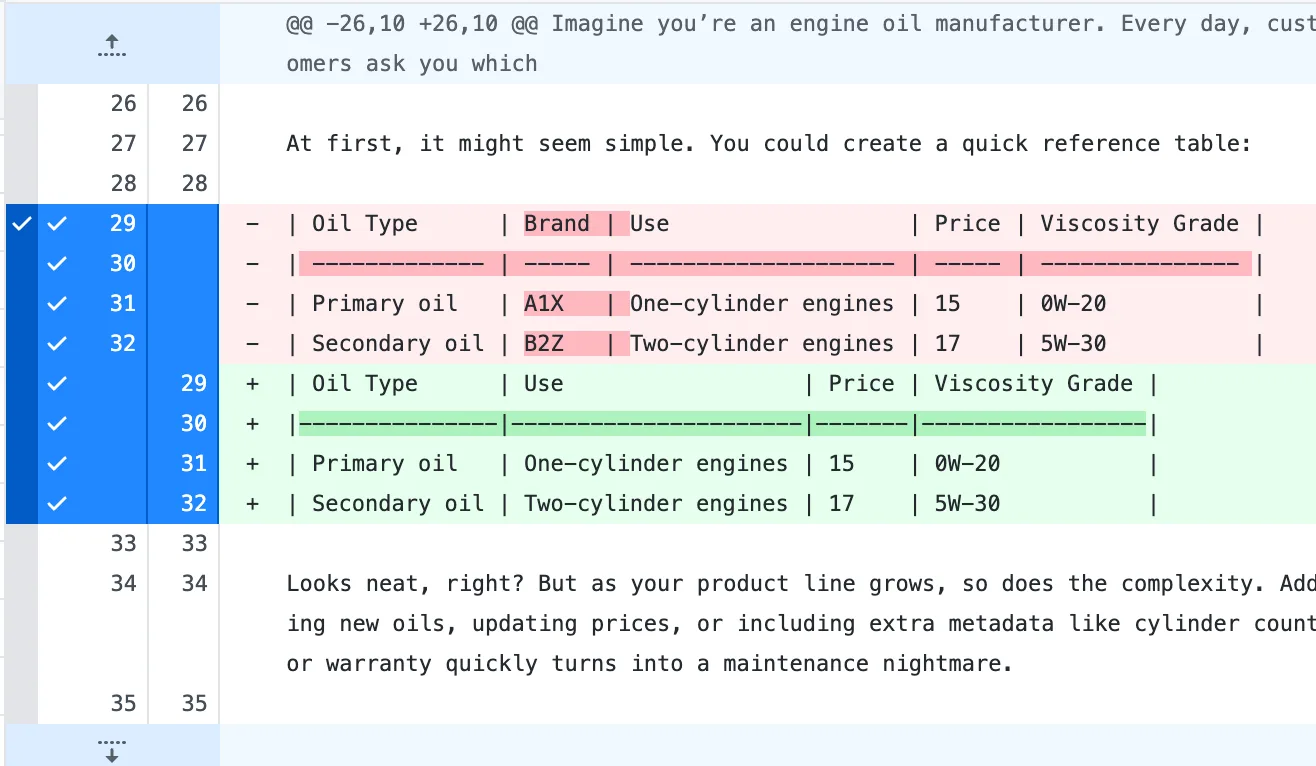
These tools help human reviewers spot changes, but Git internally still treats the entire line as modified.
Evidence 2: Removing keys from the YAML source
By contrast, when tables are generated from YAML, removing an unused field is an atomic, legible change:
Git diff: removing keys from YAML source Diff
diff --git a/src/data/oil-types.yaml b/src/data/oil-types.yaml
index 11eef57..87c04df 100644
--- a/src/data/oil-types.yaml
+++ b/src/data/oil-types.yaml
@@ -5,24 +5,20 @@ shortdesc: You will find below the recommended oil types.
 properties:
   headers:
     type: Type
-    name: Brand
     usage: Use
   row_schema:
     type: str
-    name: str
     price: float
     cylinders: int
     viscosity_grade: str
   rows:
     - type: Primary oil
-      name: A1X
       price: 15.0
       cylinders: 1
       viscosity_grade: 0W-20
     - type: Secondary oil
-      name: B2Z
       price: 17.0
       cylinders: 2
       viscosity_grade: 5W-30
Notice: Only the exact lines containing name: Brand and the corresponding product values are removed. Every other property line remains untouched, making peer reviews instantaneous.
Evidence 3: Updating table presentation in the component script
An even cleaner docs-as-code pattern is adjusting the rendering component rather than the data. If you want to hide a column across all documentation pages, you update the Astro component:
Git diff: adjusting the table rendering script Diff
diff --git a/src/components/table.astro b/src/components/table.astro
index c05af99..d594203 100644
--- a/src/components/table.astro
+++ b/src/components/table.astro
@@ -3,7 +3,6 @@ import data from "../data/oil-types.yaml";
 type OilRow = {
   type: string;
-  name: string;
   usage: string;
   viscosity_grade: string;
   price: number;
@@ -34,7 +33,6 @@ const wordsToNumber: Record<string, number> = Object.fromEntries(
     <thead>
       <tr>
         <th data-key="type" data-type="text">Type <span class="arrow">▲▼</span></th>
-        <th data-key="name" data-type="text">Brand <span class="arrow">▲▼</span></th>
         <th data-key="cylinders" data-type="cylinders">Cylinders <span class="arrow">▲▼</span></th>
         <th data-key="viscosity_grade" data-type="text">Viscosity grade <span class="arrow">▲▼</span></th>
         <th data-key="price" data-type="number">Price <span class="arrow">▲▼</span></th>
@@ -44,7 +42,6 @@ const wordsToNumber: Record<string, number> = Object.fromEntries(
       {rows.map((row) => (
         <tr>
           <td data-label="Type">{row.type}</td>
-          <td data-label="Brand">{row.name}</td>
           <td data-label="Cylinders">{numberToWords(row.cylinders)}-cylinder engines</td>
           <td data-label="Viscosity grade">{row.viscosity_grade}</td>
           <td data-label="Price">${row.price.toFixed(2)}</td>
Notice: A single 4-line change in the rendering component updates every table across your entire documentation site without touching a single record in oil-types.yaml.
Growing with your YAML: The maturity model
What begins as a simple reference file can mature into a complete documentation asset pipeline:
- 1. Flat YAML lookup file
- 2. Multi-channel reuse (DITA, API, UI)
- 3. Strong typing & constraints
- 4. Automated schema validation
- 5. Reliable CI/CD build enforcement
Our oil-types.yaml file scales through four stages:
- Structured source: The YAML file stores pure data facts once.
- Multi-channel distribution: The file generates DITA reference topics, OpenAPI JSON endpoints, and dynamic web UI components.
- Strong typing: Enforcing numeric types for prices (
float) and cylinder counts (int) prevents formatting errors. - Schema validation: A central JSON Schema or Zod validator in your CI pipeline guarantees that missing fields or malformed records fail the build before reaching production.
Why a structured source is better than embedded tables
Tables are an effective way to present structured data in a familiar, scannable layout. However, authoring user-facing tables directly in Markdown source files ties data to presentation.
A stronger alternative is to extract data at build time from a structured source, such as a YAML single source of truth. This approach allows you to render the same information in multiple ways, each tailored to the target medium and the specific needs of your audience: whether that’s a Markdown table in documentation, a JSON payload for an API, or a dynamic HTML component in a UI. See how Astro exposes YAML data through a live API for a working example of this distribution pattern.
By decoupling data from presentation, you gain maintainability, consistency, and flexibility as your content grows.
Where YAML wins, and where it doesn’t
The title of this post is deliberately bold, so it is essential to scope the architectural claim honestly. YAML outperforms the alternatives for one specific job: small-to-medium structured reference data that builds into a static site or feeds an API under Git.
Stretch it past that job and the comparison flips, because the alternatives are not strawmen; each is strong where YAML is weak:
YAML Single Source
Best fit: Reference data under Git
Small-to-medium structured reference catalogs, product specs, configuration files, and multi-format generated outputs that require clean Git diffs and branch reviews.
Markdown
Best fit: Narrative & prose
Conceptual explanations, tutorials, guides, and thought leadership where content is paragraph-driven and adding a formal schema would introduce needless friction.
XML / DITA
Best fit: Enterprise structural enforcement
Large-scale documentation teams requiring strict structural enforcement, controlled vocabularies, content specialization, and formal schema validation across multi-division publications.
Relational Database
Best fit: High-scale querying & transactions
Datasets exceeding tens of thousands of records, arbitrary SQL queries, relational joins across tables, concurrent writes, and real-time updates that occur outside static site builds.
YAML also has real trade-offs and sharp edges that a fair architectural evaluation must acknowledge:
- Indentation sensitivity
- A missing space can silently restructure an entire object hierarchy.
- Boolean parsing traps
- In older YAML 1.1 parsers, strings like
yes,no,on, andoffcan be coerced into booleans unless strictly quoted. - No built-in schema
- Unlike XML (which has native XSD/DTD validation), YAML requires an external schema validator (such as JSON Schema or Zod) to guarantee data integrity.
- Scale limits
- Parsing a 50,000-row YAML file during build time is inefficient; flat files lack relational indexes and
JOINcapabilities.
The architectural verdict: For small-to-medium structured reference data you want under Git and rendered many ways, YAML is the best-fit source of truth. It is not a universal replacement for prose or databases—it is a purpose-built lane for sustainable, docs-as-code reference information.
Learn more about getting the benefits of DITA XML without its complexity. Modern docs-as-code workflows let technical writers structure information using lightweight, open tools. No XML headaches required.
Related reading
- Automatically insert data into a reStructuredText file — generating docs from a structured data source.
- Automatically insert SQL data into a reStructuredText file — the database-backed variant of the same idea.
External sources
- YAML language reference
- Schema-based validation / strong typing
- OpenAPI: YAML as an API source of truth